When starting network in virtualizor server, i get following error
[root@virtual2 ~]# service virtnetwork start
eth0: error fetching interface information: Device not found
Error: No ip address found.
[root@virtual2 ~]#
To fix this error, find the network interface name with command
[root@virtual2 ~]# ip link
1: lo:  mtu 65536 qdisc noqueue state UNKNOWN mode DEFAULT group default qlen 1000
    link/loopback 00:00:00:00:00:00 brd 00:00:00:00:00:00
2: enp4s0:  mtu 1500 qdisc mq state UP mode DEFAULT group default qlen 1000
    link/ether 34:97:f6:00:11:1f brd ff:ff:ff:ff:ff:ff
3: natbr3:  mtu 1500 qdisc noqueue state DOWN mode DEFAULT group default qlen 1000
    link/ether 52:54:00:d9:3c:1c brd ff:ff:ff:ff:ff:ff
4: natbr3-nic:  mtu 1500 qdisc pfifo_fast master natbr3 state DOWN mode DEFAULT group default qlen 1000
    link/ether 52:54:00:d9:3c:1c brd ff:ff:ff:ff:ff:ff
[root@virtual2 ~]#
In this case, the name is enp4s0, we need to add this name in
Virtualizor Admin > Configuration > Master or Slave Settings > Network Settings > Network Interface
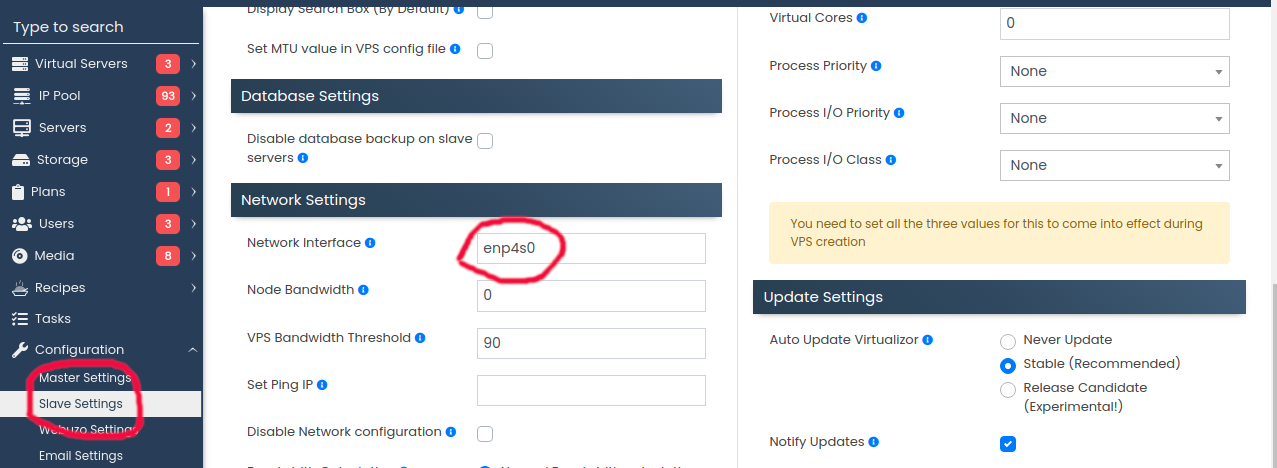
If you have master and slave severs, you need to select master or slave depending on where you get this error. If slave, there is a drop down, you need to select the correct server, then set the interface name.
Visited 1 times, 1 visit(s) today
