By default OpenLiteSpeed use /tmp/lshttpd/swap for temp files. If your /tmp partition is small, disk may get full.
To move OpenLiteSpeed swap partition to / partition do the following.
mkdir -p /lswstmp/lshttpd/swap
chmod 750 /lswstmp/lshttpd
chmod 700 /lswstmp/lshttpd/swap
chown -R nobody:nobody /lswstmp/lshttpd
Now login to OpenLiteSpeed admin interface at
https://your-server-ip:7080/login.php
If you don’t have user name and password, you can reset it by running command
/usr/local/lsws/admin/misc/admpass.sh
Once logged in, go to
Server Configuration > General
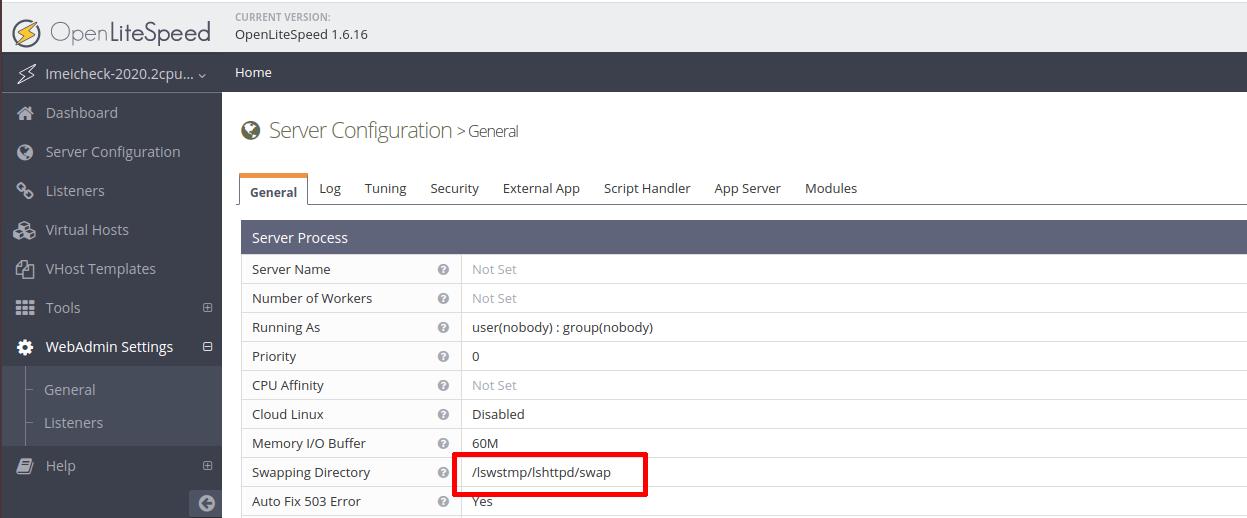
Under “Server Process’ section, you need to edit value of “Swapping Directory”. Default value is “/tmp/lshttpd/swap”, change it to “/lswstmp/lshttpd/swap”.
Restart OpenLiteSpeed. You can do it using web interface or using SSH.
systemctl restart lsws
Visited 1 times, 1 visit(s) today
